> ## Documentation Index
> Fetch the complete documentation index at: https://docs.tilt.io/llms.txt
> Use this file to discover all available pages before exploring further.
# Manage monitoring policies
> Inspect the scope and effective behavior of advisor monitoring, then confirm a policy change.
Monitoring policies help an advisor watch model drift, sleeve tracking error, cash bands, and factor exposure. A policy can belong to the organization, a model portfolio, or a client account. Select the exact scope and rule type before changing it.
## 1. Inspect the current policy
Ask Tilt Agent: **"Show the cash-band monitoring policy for Taylor Morgan's account, including any portfolio or organization policy it inherits. Do not change it."**
In the Tilt view, open **Clients**, select Taylor, and open **Monitoring Rules**. The demo account has no cash monitoring override at this level; check any inherited portfolio or organization policy before changing it.
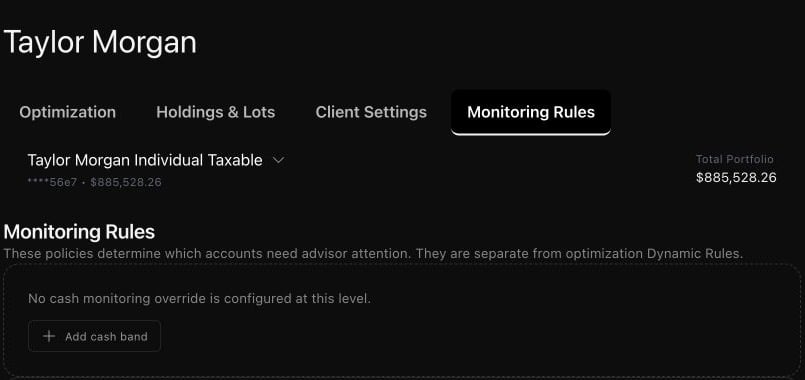 Review whether the selected scope has its own policy, inherits a broader one, or has a disabled policy. Disabling an account or portfolio policy can restore a broader enabled policy; it does not necessarily stop monitoring. Check the effective result before deciding what to change.
## 2. Propose a dated change
Ask: **"Propose the cash-band limits I specify for this account, simulate them on the dates I choose, and show the complete replacement before saving."** Review the selected account, rule type, ordered entries, dates, and inherited behavior. A proposal or simulation does not save the policy.
Confirm the complete change, then ask Tilt Agent to read back the saved policy. If another change occurred, inspect and propose again rather than retrying an outdated confirmation. Factor-exposure policies use their own scope-specific inspection; name the organization, portfolio, or account you mean.
[Dynamic Rules](/advisor/configuration-and-rules) resolve optimization settings for an account. Monitoring policies provide oversight and alert conditions; saving one does not submit an optimization or place an order.
Review whether the selected scope has its own policy, inherits a broader one, or has a disabled policy. Disabling an account or portfolio policy can restore a broader enabled policy; it does not necessarily stop monitoring. Check the effective result before deciding what to change.
## 2. Propose a dated change
Ask: **"Propose the cash-band limits I specify for this account, simulate them on the dates I choose, and show the complete replacement before saving."** Review the selected account, rule type, ordered entries, dates, and inherited behavior. A proposal or simulation does not save the policy.
Confirm the complete change, then ask Tilt Agent to read back the saved policy. If another change occurred, inspect and propose again rather than retrying an outdated confirmation. Factor-exposure policies use their own scope-specific inspection; name the organization, portfolio, or account you mean.
[Dynamic Rules](/advisor/configuration-and-rules) resolve optimization settings for an account. Monitoring policies provide oversight and alert conditions; saving one does not submit an optimization or place an order.