> ## Documentation Index
> Fetch the complete documentation index at: https://docs.tilt.io/llms.txt
> Use this file to discover all available pages before exploring further.
# Read proposal reports and account backtests
> Inspect a saved optimization result and compare account scenarios using their own evidence.
Proposal reports explain a completed optimization. Account backtests compare modeled scenarios over a period. Choose the tool that answers your question, and keep its account, inputs, and date range attached to every result.
## Read a completed proposal
Ask Tilt Agent: **"For Taylor Morgan's completed proposal, show the full proposed allocation, the main trades, turnover, costs, and the settings used by that run."**
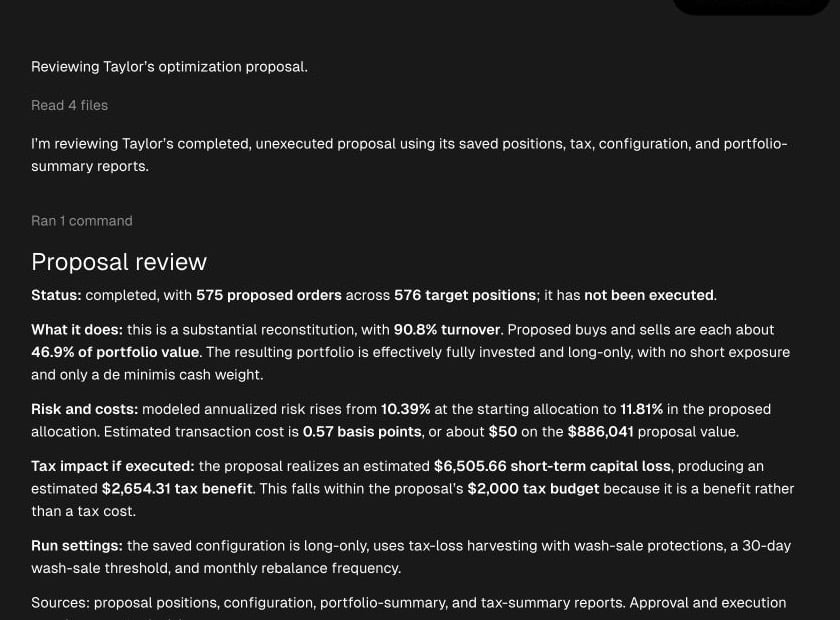 Check the exact account and completed proposal first. The proposed holdings and trades come from position evidence; turnover, risk, and costs come from summary evidence. Settings used by the run come from its saved configuration, which may differ from the account's current settings. Ask for the relevant tax report before discussing estimated tax if executed.
For a question such as **"Why did the proposal change this ticker's weight?"**, ask Tilt Agent to inspect that ticker's decomposition and attribution evidence. A position change alone shows the outcome, not its cause. Reports describe proposed trades and estimated effects until execution is verified.
## Compare account scenarios with a backtest
Ask: **"Compare two explicitly named settings for Taylor Morgan's account over the same dates. Show the assumptions and the saved results for both backtests."** Review the account, effective settings, comparison dates, and scenario inputs before confirming the runs. Wait for both jobs to finish, then check that the reported results belong to the confirmed pair.
Account backtests start from synthetic USD cash. They do not replay the account's current tax lots as starting holdings. A pending or failed job has no completed comparison; changed settings can make an earlier comparison stale. A backtest neither approves a proposal nor executes trades.
For setup of a single run, start with [Review a rebalance](/advisor/review-rebalance). For book-wide proposal status, use [Review your advisor book](/advisor/book-health).
Check the exact account and completed proposal first. The proposed holdings and trades come from position evidence; turnover, risk, and costs come from summary evidence. Settings used by the run come from its saved configuration, which may differ from the account's current settings. Ask for the relevant tax report before discussing estimated tax if executed.
For a question such as **"Why did the proposal change this ticker's weight?"**, ask Tilt Agent to inspect that ticker's decomposition and attribution evidence. A position change alone shows the outcome, not its cause. Reports describe proposed trades and estimated effects until execution is verified.
## Compare account scenarios with a backtest
Ask: **"Compare two explicitly named settings for Taylor Morgan's account over the same dates. Show the assumptions and the saved results for both backtests."** Review the account, effective settings, comparison dates, and scenario inputs before confirming the runs. Wait for both jobs to finish, then check that the reported results belong to the confirmed pair.
Account backtests start from synthetic USD cash. They do not replay the account's current tax lots as starting holdings. A pending or failed job has no completed comparison; changed settings can make an earlier comparison stale. A backtest neither approves a proposal nor executes trades.
For setup of a single run, start with [Review a rebalance](/advisor/review-rebalance). For book-wide proposal status, use [Review your advisor book](/advisor/book-health).