Use a bulk optimization when you want proposals for a defined group of client accounts. The workflow keeps each account’s result separate for review. It does not approve or execute orders.

1. Define the cohort

Ask Tilt Agent: “Check optimization readiness for Taylor Morgan and the other named clients in this cohort. Show every account you would include, skip, or block. Do not submit a run yet.” Review the client and account names, saved inputs, and skipped or blocked reasons. Say whether you mean every account for those clients or only named accounts. Resolve blockers and any unsaved changes before requesting submission. In the Tilt view, open Bulk Optimization, select the intended clients under Select Clients to Optimize, and check the count on Run Optimization before submitting. The recent activity cards above the selection area use their own date filter.
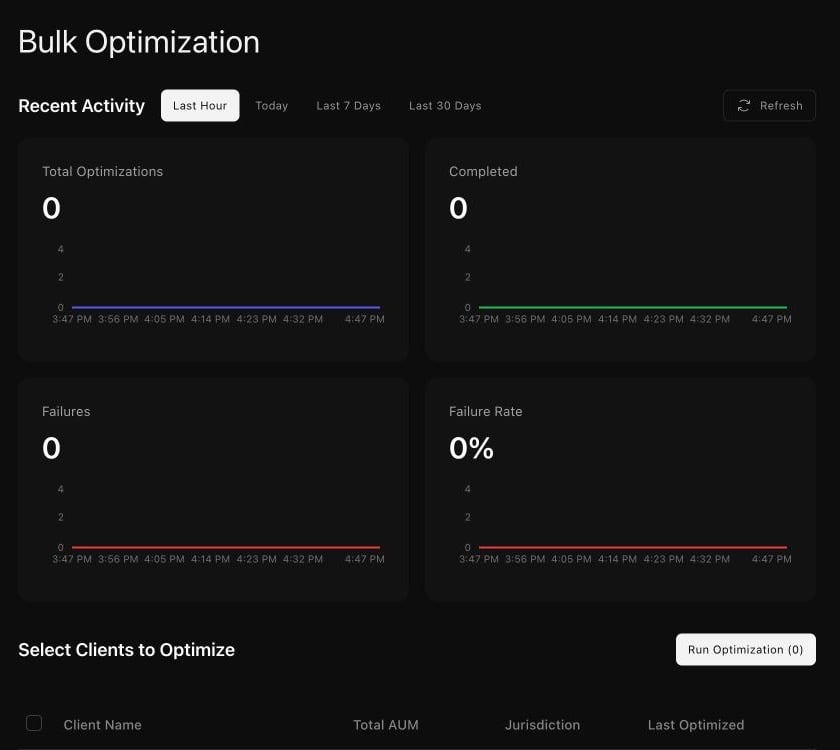
The Bulk Optimization page shows recent activity counts and the Select Clients to Optimize area with a disabled Run Optimization button before clients are selected.

The bulk view shows recent activity and the cohort selection area before a run.

2. Confirm and follow the run

Ask Tilt Agent to submit the inspected cohort only after its membership matches your intent. An explicit submission request authorizes the run; do not expect another confirmation step. If holdings, settings, or membership change, request a new inspection before submitting. The run may finish at different times for different accounts; follow it until each submitted proposal reaches a terminal outcome. An interrupted status check is a reason to continue reading the same run. It is not a reason to submit the cohort again. A failed subset needs diagnosis and a separately confirmed retry.

3. Review account outcomes

Ask: “Show each account’s completed, failed, or skipped result, and open the proposal for Taylor Morgan’s account.” Check the account identity and proposal status before reading its target and reports. A completed proposal with no trades is a valid no-action result. Review a rebalance explains the individual proposal boundary. Bulk optimization produces reviewable proposals. Trade approval remains a separate decision for each account.