

1. Check account readiness
Ask Tilt Agent: “Check whether Taylor Morgan’s account is ready for optimization. Show its saved holdings, assigned portfolio, and any blockers. Do not run an optimization yet.” Check the client and account identity, holdings freshness, assigned model, and effective allocation. Resolve any missing holdings, assignment, or configuration blocker before proceeding. If an earlier completed proposal is still current, ask to review it first.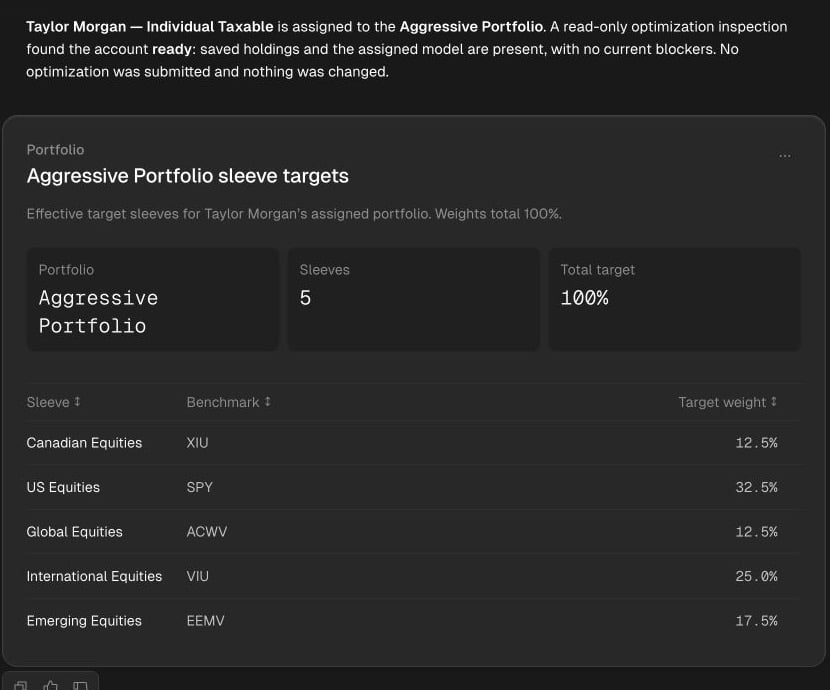
A read-only production demo check found Taylor's saved holdings and portfolio assignment ready, without submitting an optimization.
2. Request an optimization
When the saved inputs are right, ask: “Run an optimization for Taylor Morgan’s account using its saved Aggressive Portfolio and current settings.” This explicit request authorizes submission; Tilt Agent does not promise another confirmation before starting the job. If the account or inputs changed since your readiness check, inspect them again before sending the run request. The account’s Optimization tab warns when holdings or configuration changed after a prior run; a stale proposal requires a new optimization before execution. Tilt Agent follows the run until it finishes and retains the proposal. A pending run has no result to review yet. If the run fails, inspect the stated reason before deciding whether to request another run.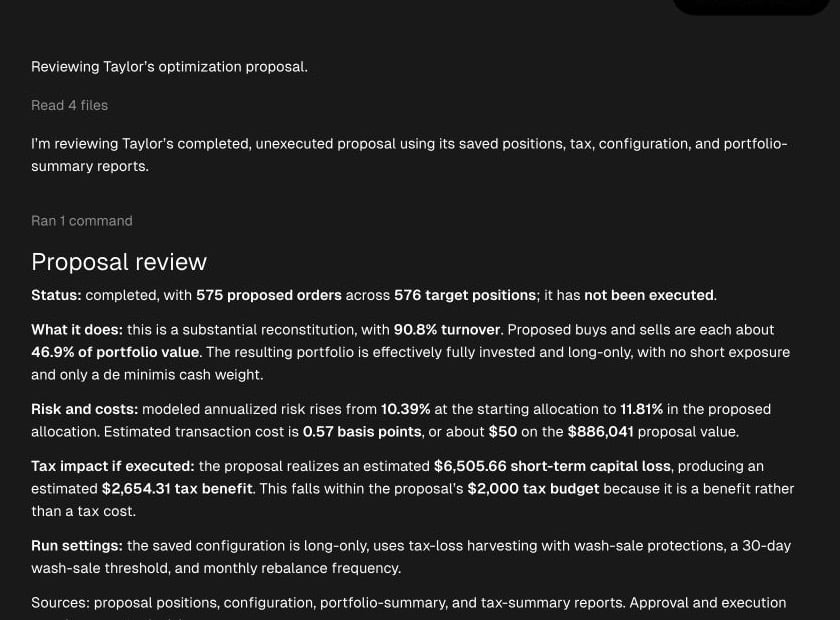
Tilt Agent reviews Taylor's saved proposal and explicitly identifies it as unexecuted.